
SafenSoft SysWatch Personal3.6 - Download
You'll be able to download in few seconds.
Publisher Description
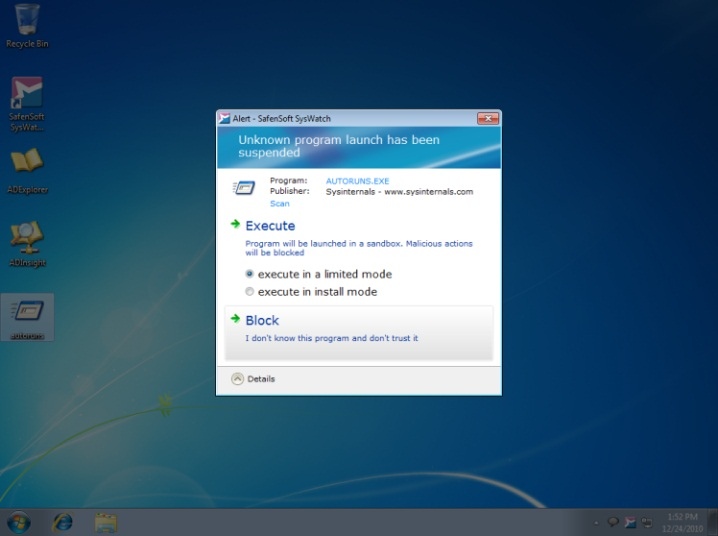
SysWatch Personal is designed to work alongside - or even replace - Microsoft Security Essentials and other signature-based security software to provide comprehensive protection for your computer. It does this by combining whitelisting, sandboxing, and behavioral analysis techniques to keep malware and intruders out - automatically. What's more, you don't lose system performance to resource-intensive scanning activities. Once you've created your system profile and trusted application register, SysWatch automatically detects and prevents unknown code (which all malware is) from executing on your PC, protecting your entire system. SysWatch Personal protects your computer proactively by controlling how applications behave. It keeps your whole system in a 'known-good' state, preventing hacker attacks and malicious software from activating. Because SysWatch Personal does not need to identify individual threats in order to block them, it doesn't need all those signature updates required by traditional security software to provide reliable protection. While you don't need to run a traditional antivirus program as well as SysWatch, you may feel more comfortable doing so until you have gained full trust in the SysWatch approach to computer security. SysWatch is fully compatible with all popular antivirus programs.
About SafenSoft SysWatch Personal
This Antivirus Tools program is available in English, Russian. It was last updated on 29 September, 2026. SafenSoft SysWatch Personal is compatible with the following operating systems: Windows.
The company that develops SafenSoft SysWatch Personal is SafenSoft. The latest version released by its developer is 3.6.
The download we have available for SafenSoft SysWatch Personal has a file size of 65.0 MB. Just click the green Download button above to start the downloading process. The program is listed on our website since 2011-03-25 and was downloaded 0 times. We have already checked if the download link is safe, however for your own protection we recommend that you scan the downloaded software with your antivirus. Your antivirus may detect the SafenSoft SysWatch Personal as malware if the download link is broken.
How to install SafenSoft SysWatch Personal on your Windows device:
- Click on the Download button on our website. This will start the download from the website of the developer.
- Once the SafenSoft SysWatch Personal is downloaded click on it to start the setup process (assuming you are on a desktop computer).
- When the installation is finished you should be able to see and run the program.
Program Details
System requirements
Download information
Pricing
Version History
version 3.6
posted on 2011-03-25
Improved: Auto adjust
New: Script execution control
New: Block DLL Hijacking
Improved: Alerting system
Improved: Application activity history and rollback to remove unwanted changes
Improved: Application launch control
Improved: Automatic incident processing
Improved: Core integrity engine
Disclaimer
External Download
We do not host SafenSoft SysWatch Personal on our servers. We did not scan it for viruses, adware, spyware or other type of malware. This app is hosted by the software publisher and passed their terms and conditions to be listed there. We recommend caution when installing it.
The external download link for SafenSoft SysWatch Personal is provided to you by apps112.com without any warranties, representations or guarantees of any kind, so access it at your own risk.
If you have questions regarding this particular app contact the publisher directly. For questions about the functionalities of apps112.com contact us.
